
Monitor all your cards, trailers, vans, trucks, heavy equipment, etc. and keep track of their maintenance, parts, fuel consumption, and repairs.
Fleet Maintenance Pro Standard is a maintenance tool that helps to keep track of equipment, vehicles and more. This includes scheduling preventive maintenance, repairs, cost, parts, etc. It also has a reminder system.
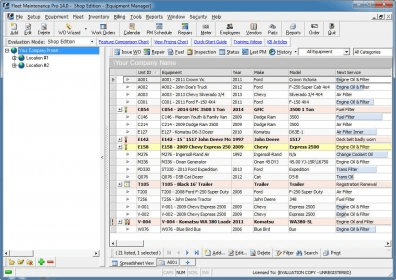
It automatically calculates and reports maintenance due for a fleet. When running the program, an automated color-coded alerts instantly show which vehicles and equipment are due for service at all times.
Fleet Maintenance Pro is similar to MS Excel in the way it displays columns and rows; it also contains different categories and commands to organize services and equipment. It is recommended to download the Quick start guide in order to fully understand how it works.
A Wizard helps users to go through the process: each vehicle is ready to remind the user everything, from the next oil change to when its insurance needs to be renewed.
The program manages fleet inventory and register repairs, fuel, parts, services, characteristics, suppliers, vendors, employees, and user-definable fields.
The minus of this application is that the amount of time users might have to spend manually entering the information about equipment and services is great. It would be better to have some common options to choose from, to avoid writing so much.
The application runs performance reports, reviews upcoming maintenance and other reports just with a few clicks.
In this version the reports can be exported to spreadsheets, XML, CSV and other file formats. Now it is compatible with Windows 7. Users can customize the program to track the information and print out customized detailed reports to get determined information.






Comments (1)